Predictive charging — Time Slot mode
Charges from the grid during a fixed time window (typically cheap overnight tariff).
Configuration
| Field | Description |
|---|---|
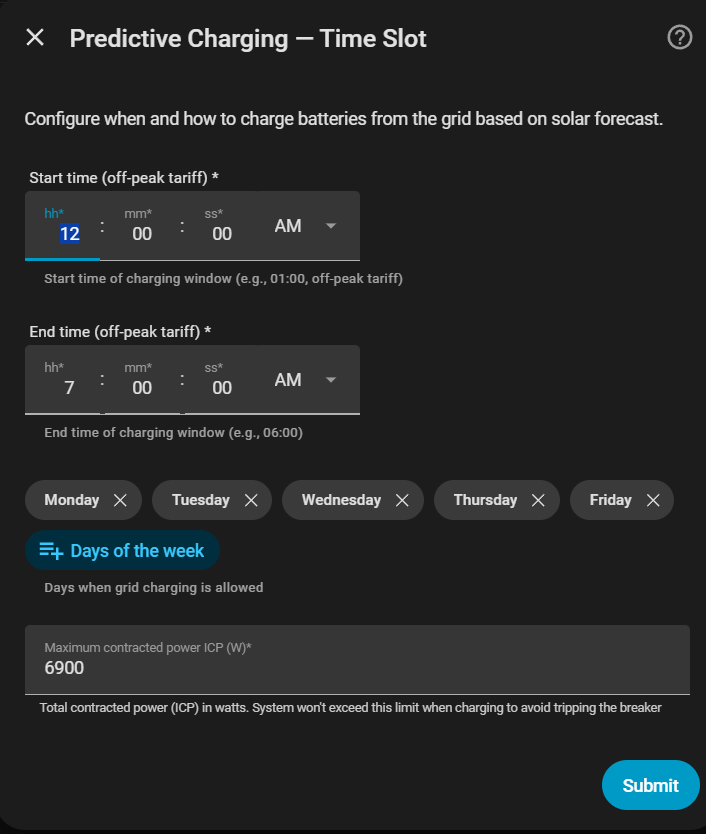
| Charging window 1 | Start and end of the first charging slot (e.g. 02:00 – 05:00), plus the days of the week it applies |
| Charging windows 2 & 3 | (Optional) Up to two more windows, each with its own start/end and days |
| Solar forecast sensor | Current-day production sensor in kWh (optional) |
| Solar forecast safety margin (kWh) | Extra energy buffer added to consumption forecast before deciding whether to charge (default 0 kWh) |
| Predictive grid charge margin (%) | Extra % charged from the grid on top of the solar deficit (default 0%) |
Up to 3 windows
You can configure 1, 2 or 3 charging windows — useful for a split tariff with both a night and a midday off-peak block. Fill only window 1 for the previous single-window behaviour; each extra window needs both a start and an end time (fill both or leave both empty). These windows schedule predictive grid charging only: household-consumption history still covers all 24 hours, while the battery's negative AC power removes its own charging energy from the derived home load.
No solar sensor
If you have no solar panels, leave the forecast sensor empty. The system will charge whenever battery energy is insufficient to cover expected consumption.
Evaluation flow
- On slot entry: the system evaluates the remaining energy balance immediately when no solar forecast is configured or the configured forecast is readable. If the forecast is temporarily unavailable, the evaluation is retried for up to five minutes so a transient provider update does not produce a false decision.
- After the evaluation: the system simulates consumption, solar and usable battery energy in 15-minute intervals until midnight. If the forecast remains unavailable after the retry grace, it evaluates conservatively with zero solar.
- Every configured window receives its own kWh quota. Energy needed before a projected minimum-SOC crossing is assigned only to windows that can deliver it in time; later energy is distributed across the remaining configured windows.
- A notification is sent with the decision. If no configured window can meet a deadline, the diagnostic attributes expose the uncovered kWh instead of claiming that a later window covers it.
- Charging stops when the current window's quota is stored or when the window ends. The first window therefore no longer consumes the whole flexible daily target by default.
The planner never opens an unconfigured charging window. A deadline shortfall means the configured windows or physical charging power cannot deliver enough energy in time; normal household grid import can still occur after the battery reaches its minimum.
SOC-drop re-evaluation
If the SOC drops 30 % or more from the last evaluation point during the slot (e.g. due to high consumption), the system automatically re-evaluates the energy balance. No additional notification is sent for these mid-slot re-evaluations.
Time Slot and Dynamic Pricing use one shared dated solar timeline and one remaining-energy budget. The learned profile changes intraday deadlines automatically once it is mature; until then the sinusoidal curve is used. It never increases the forecast total or opens a window that was not configured.