ESPHome / LilyGo RS485
Use this route to bring a Marstek Venus E into Omnibattery through a LilyGo board running ESPHome. It keeps battery control in Home Assistant when the board is already connected to the battery's RS-485 port, rather than connecting to the battery with Modbus TCP.
Do I need it?
| Battery | Connection route | Choose this route when |
|---|---|---|
| Marstek Venus E with the v2 register map | LilyGo RS485 bridge exposed through ESPHome | The bridge is already installed and appears as an ESPHome device in Home Assistant |
Use it if you have the supported LilyGo/ESPHome bridge and want Omnibattery to use the battery entities it exposes. You do not need it if Home Assistant reaches the battery directly through Modbus TCP, a Modbus gateway, or a serial adapter; use Marstek Venus instead.
This route is for Venus E. It is not a route for Venus A, Venus D, or Venus E v3.
Before you start
- Install the marstek-lilygo-rs485 firmware project on a LilyGo T-CAN485 board and add it to Home Assistant through ESPHome. For wiring and firmware installation, see that project.
- Confirm that the ESPHome device is online and its battery entities use the firmware's stock names.
- Confirm that the battery's Battery State Of Charge, Battery Power, and AC Power entities have usable values.
How to add it
- Open Settings → Devices & services → Omnibattery → Configure. Add a battery if the installation does not already have one.
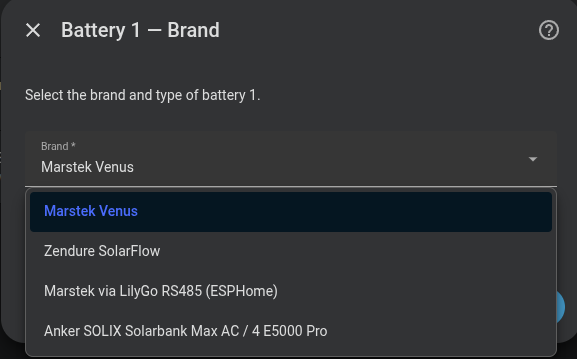
- At the battery brand step, select Marstek via LilyGo RS485 (ESPHome).
- In Configure battery {battery number} — Connection (LilyGo/ESPHome), enter a Name and select the ESPHome device that represents the LilyGo bridge.
- Continue to Configure battery {battery number} — Limits and set Maximum charge power (W), Maximum discharge power (W), Maximum SOC (%), and Minimum SOC (%) for the battery.
What you will see
Omnibattery provides automatic charge/discharge control and the usual Marstek controls, including Force Mode, Set Forcible Charge Power, Set Forcible Discharge Power, Max Charge Power, Max Discharge Power, and hardware state-of-charge cutoffs.
You will also see battery state of charge (SOC), battery and AC power, energy counters, temperature, voltage, cell-voltage, inverter-state, and connection diagnostics when the firmware publishes them. Telemetry normally updates on the bridge's approximately 3-second battery poll.
Unlike a direct Modbus connection, Omnibattery does not communicate with the battery itself on this route: it reads and writes the ESPHome entities. There is no MPPT solar telemetry, and individual warning entities replace aggregate alarm registers.
If it does not work
| Symptom | Likely cause | What to check |
|---|---|---|
| The LilyGo board is not offered as an ESPHome device | ESPHome has not added the board as a device, or it is offline | Check the ESPHome integration and confirm the board is online in Home Assistant |
| The wizard says required entities are missing | The board is not using the supported firmware, or its entity names were changed | Install the supported firmware and restore its stock entity names; see the required names below |
| Setup completes but the battery is unavailable | The bridge is online but Battery State Of Charge is unknown or unavailable |
Check that the battery and bridge are communicating, then wait for a usable SOC value |
| Commands have no effect | A required ESPHome control entity is unavailable or the bridge is not reaching the battery | Check Forcible Charge-Discharge, Forcible Charge Power, Forcible Discharge Power, and RS485 Control Mode in the ESPHome device |
| Values stop changing while the board still looks online | The bridge's battery polling has stalled | Check the ESPHome logs and the RS-485 connection; Omnibattery stops using stale battery telemetry rather than control from old values |
With Backup Function on, the status stays at backup_mode and the battery is never controlled |
The firmware does not publish AC Offgrid Power (register 32302), so Omnibattery cannot tell whether the off-grid port is in use and keeps the battery excluded | Add the sensor below to the LilyGo YAML, or turn Backup Function off |
Advanced details
Omnibattery identifies this connection by the selected Home Assistant ESPHome device, not by an IP address or Modbus endpoint. The bridge owns the RS-485 connection, so this route has no parallel direct Modbus path.
Entity matching uses the ESPHome entity registry's original name, converted to a slug. Renaming an entity ID in Home Assistant therefore normally does not break matching. The required stock entity names are Battery State Of Charge, Battery Power, AC Power, Forcible Charge-Discharge, Forcible Charge Power, Forcible Discharge Power, and RS485 Control Mode.
Commands use Home Assistant's select.select_option and number.set_value services. The bridge polls the battery every approximately 3 seconds; Omnibattery treats all battery-sourced telemetry as stale after 120 seconds without any report, even if ESP-local Wi-Fi entities are still updating.
Off-grid power sensor for Backup Function
The stock firmware YAML does not read register 32302. Add this block to your LilyGo YAML, keeping the name exactly as written, then reload Omnibattery: