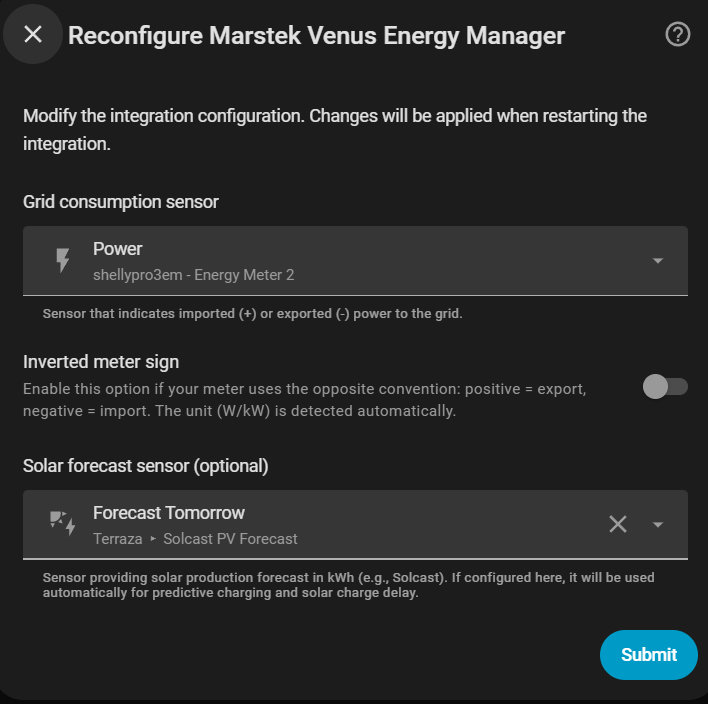
Main sensor
The first step configures the global data sources for the integration.
Grid consumption sensor
A Home Assistant sensor that measures power exchange with the grid (in W or kW).
Compatible sensors
Any sensor that exposes grid power works: Shelly EM, Shelly EM3, Neurio, smart meter integrations (e.g. sensor.grid_power).
Update frequency
The sensor should update as fast as possible. The controller is event-driven — it recalculates each time this sensor publishes a new value — so the sensor's update rate is the control rate: a faster sensor means a faster, more accurate response. (A 2-second watchdog still runs the cycle if the sensor goes quiet.)
Home consumption can vary by several kilowatts in fractions of a second (appliance start-ups, oven, washing machine…). A sensor that reports every 10 seconds or more introduces a lag that causes the controller to react to a situation that no longer exists, leading to overshoot or unnecessary corrections.
Recommended: 1–2 second update interval. Devices like Shelly EM/EM3 support this natively.
Automatic kW detection
If the sensor's unit_of_measurement attribute is kW, the integration multiplies the value by 1000 automatically.
Inverted sign
Enable "Inverted meter sign" if your sensor uses the opposite convention:
| Convention | Import | Export |
|---|---|---|
| Standard (default) | Positive value | Negative value |
| Inverted | Negative value | Positive value |
Leave it disabled if you are unsure.
Maximum contracted power
The contracted power of your grid connection, in W (default 7000).
The integration caps battery charging so that projected grid import never exceeds this limit, preventing the main breaker from tripping. This applies in every mode — normal setpoint control, a positive target/offset, hourly net balance and predictive grid charging — not only while charging from the grid on a schedule. It only limits charging; it never forces a discharge.
Solar forecast sensor (optional)
Sensor providing today's estimated solar production in kWh or Wh.
Configuring it here makes it available to:
- Predictive charging (Time Slot and Dynamic Pricing modes)
- Solar charge delay
You can also leave it blank and configure it later in those specific sections.
Home consumption (derived automatically)
There is no household consumption sensor field in setup — the integration derives your total home consumption from sensors it already has:
Home consumption = Grid power + Battery AC power + Solar power
This is the value shown by the energy-flow diagram and the sensor.marstek_venus_system_home_consumption sensor, and it feeds the 7-day history used by predictive charging and charge delay. Accumulation runs during the solar+battery window only (outside the configured charging time slot; all day if none); the counter resets at midnight and survives HA restarts.
Legacy household sensor
Installs created before this field was removed may still have a household_consumption_sensor saved in their config. It is honoured only when no solar production sensor is configured — with a solar sensor the derived value is exact and preferred, so the saved sensor is ignored.
Solar production sensor (optional)
This is the real-time PV production power sensor (W or kW) from an external invertor not wired through the battery MPPT inputs. It is used to show the Solar node in the dashboard energy-flow diagram. Leave empty if your solar panels feed the battery MPPT directly.